Enhance Your Web Design with Magic Leaf Font
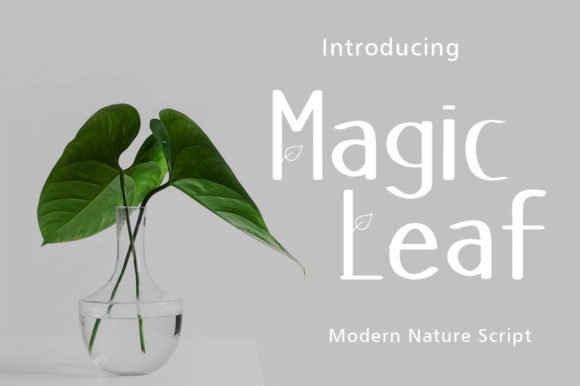
Magic Leaf is a premium display font that brings a friendly and approachable feel to any digital project. Its neat, lettered style makes it incredibly versatile, fitting seamlessly into a wide range of contexts. Whether you're designing a creative portfolio, a boutique online store, or a coaching website, Magic Leaf can add a unique touch to your web design.
Visual Characteristics and Personality
Magic Leaf features clean, well-spaced letters with a slight hand-drawn quality, giving it a personal and inviting appearance. This makes it perfect for creating a warm, welcoming atmosphere on your website. The font's readability and charm make it ideal for headers, hero sections, and call-to-action areas, where it can grab the user's attention and set the tone for the rest of the page.
Using Magic Leaf in Web Design
When it comes to web design, Magic Leaf shines in several key areas:
- Website Headers and Hero Sections: Use Magic Leaf for bold, eye-catching titles that immediately draw visitors in. Its clear, readable style works well even at larger sizes, making it perfect for impactful first impressions.
- Landing Pages and Call-to-Action Areas: The friendly and engaging nature of Magic Leaf can enhance the effectiveness of your CTA buttons and short phrases. It encourages users to take action with its inviting and approachable style.
- Online Shop Banners and Product Pages: For an online store, Magic Leaf can be used creatively in banners, product descriptions, and promotional graphics. Its versatility allows it to blend well with both modern and traditional designs, enhancing the overall shopping experience.
Readability and Visual Hierarchy
One of the key strengths of Magic Leaf is its excellent readability. Even at smaller sizes, the font remains clear and legible, making it suitable for section headings and short paragraphs. When used in combination with a simple sans serif font for body copy, Magic Leaf can help establish a strong visual hierarchy, guiding the user's eye through the content and improving overall readability.
Brand Tone and User Engagement
The personality of Magic Leaf can significantly influence the brand tone of your website. Its friendly and approachable style can build trust and create a more engaging user experience. For example, using Magic Leaf in a creative portfolio can showcase your work in a more personal and relatable way, while in a coaching website, it can convey a sense of warmth and support.
Font Pairing and Design Assets
To maximize the impact of Magic Leaf, consider pairing it with a clean, simple sans serif font for body text. This combination ensures that the main content remains highly readable while allowing Magic Leaf to stand out in headings and key areas. Additionally, you might use a serif font for a more editorial and sophisticated look, especially in blog headers or course pages.
Practical Considerations for Digital Design
When incorporating Magic Leaf into your digital projects, keep these practical tips in mind:
- Mobile Readability: Test Magic Leaf on mobile screens to ensure it remains legible and visually appealing. Adjust font sizes and line heights as needed to maintain clarity.
- Responsive Layouts: Ensure that Magic Leaf scales well across different devices and screen sizes. Responsive design principles will help maintain its effectiveness and readability.
- Backgrounds and Overlays: Use Magic Leaf over both light and dark backgrounds, and consider adding subtle shadows or outlines to enhance visibility. This is particularly useful for image overlays and decorative accents.
Commercial Licensing and Availability
Before using Magic Leaf in your commercial projects, such as client websites, online stores, or digital templates, check the licensing terms. Most premium fonts come with specific usage rights, so it's important to ensure you have the appropriate license for your intended use. Magic Leaf is typically available in various file formats, including webfont options, which are essential for seamless integration into web design.
In conclusion, Magic Leaf is a versatile and charming display font that can elevate your web design projects. Its friendly and readable style makes it an excellent choice for headers, hero sections, and call-to-action areas, while its compatibility with other fonts enhances the overall visual hierarchy and brand identity. By carefully considering its use in different contexts and ensuring proper licensing, you can create engaging and professional web experiences that resonate with your audience.